Acer KB272 27-Inch Monitor Review: Budget FHD Display for 2024
The Acer KB272 is a 27-inch Full HD monitor that promises 120Hz refresh rates, vibrant IPS color accuracy, and gaming features at just $99. We put this budget display through its paces to see if it delivers real value for home office workers and casual gamers.

David Brooks
Tech & Peripherals Reviewer · Jun 03, 2026
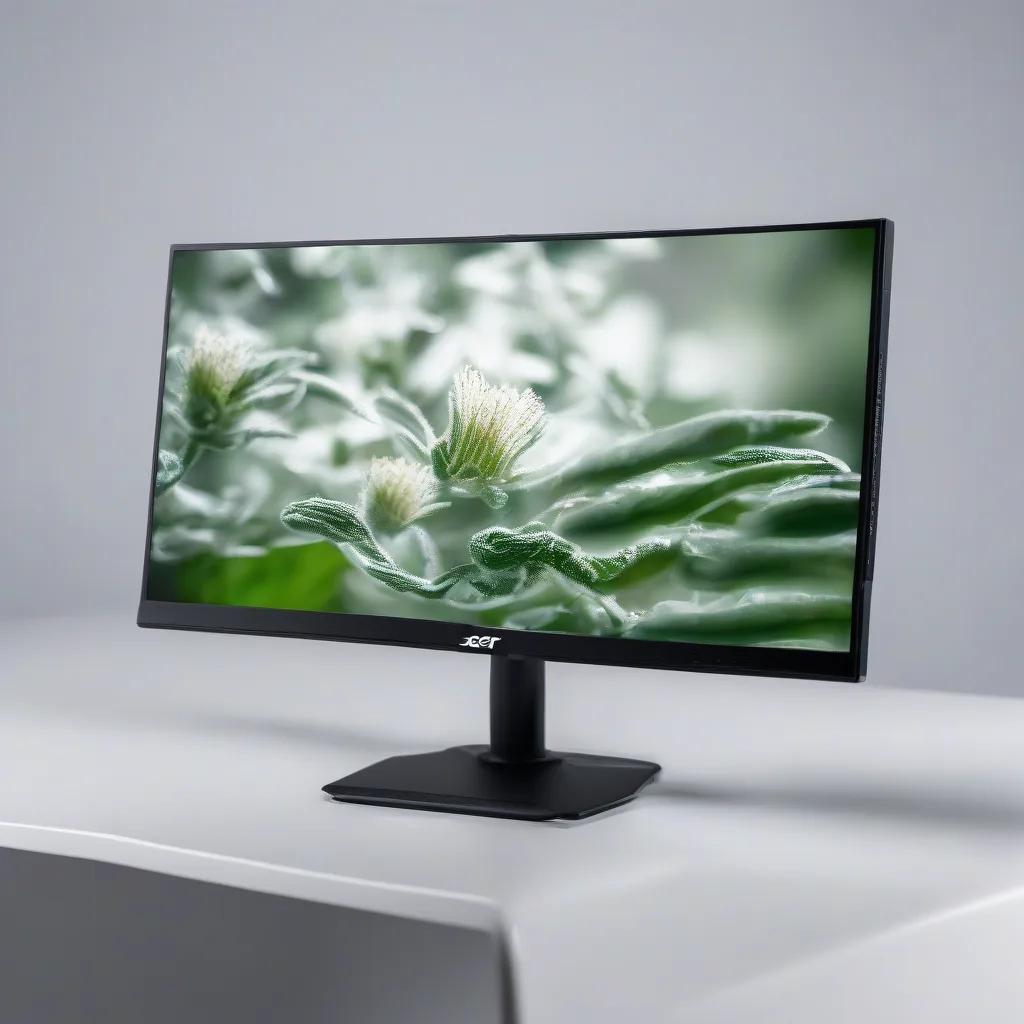

Acer 27 Inch Monitor- KB272-27 Inch FHD IPS (1920 x 1080) Display, Up to 120Hz Refresh Rate, 99% sRGB, Tilt, Adaptive-Sync Support (FreeSync Compatible) 1ms (VRB), sRGB 99% Color, HDMI & VGA Ports
* Prices may vary. Last updated 5 hours ago. As an Amazon Associate we earn from qualifying purchases.
Finding a quality 27-inch monitor under $100 sounds almost too good to be true in today's market. Yet the Acer KB272 promises exactly that—a Full HD IPS display with gaming-friendly features at a price point that makes you do a double-take. After spending considerable time with this monitor in a real home office environment, I'm here to give you the complete picture of what works, what doesn't, and whether this display deserves a spot on your desk.
This review covers everything from build quality and color accuracy to real-world performance for both productivity tasks and casual gaming. Whether you're setting up your first home office or looking for an affordable secondary display, let's dive into what the Acer KB272 actually delivers.
Key Specifications
| Specification | Details |
|---|---|
| Screen Size | 27 inches |
| Resolution | 1920 x 1080 (Full HD) |
| Panel Type | IPS |
| Refresh Rate | Up to 120Hz |
| Response Time | 1ms (VRB) |
| Contrast Ratio | 100,000,000:1 (dynamic) |
| Color Gamut | 99% sRGB |
| Adaptive Sync | FreeSync Compatible |
| Connectivity | HDMI, VGA |
| Adjustability | Tilt only |
| Price | $99.00 |
Design and Build Quality
The KB272 features what Acer calls a frameless bezel design, and while there is technically a thin border around the display, it's minimal enough to look clean and modern. The thin enclosure keeps the overall footprint manageable, making it work well even on smaller desks. The stand is basic but stable, offering tilt adjustment between -5 and 15 degrees. At this price point, you won't get height adjustment or pivot functionality, but the monitor does support VESA mounting if you want to add it to a monitor arm later.
The build feels solid for a budget display. There's minimal flex in the panel, and the matte finish on the screen does a decent job reducing glare from overhead lighting—an important consideration for home office setups.
Display Performance
Here's where things get interesting. The 27-inch IPS panel delivers genuinely impressive color reproduction for the price. That 99% sRGB coverage isn't just marketing speak—colors appear vibrant and accurate enough for everyday photo editing, graphic design work, and content consumption. The IPS technology ensures viewing angles remain consistent, which is particularly useful if you occasionally watch content with others or position your monitor at an angle.
The 1920 x 1080 resolution on a 27-inch display gives you about 82 pixels per inch. While not as sharp as a 1440p panel, it's perfectly serviceable for most home office tasks, web browsing, and document editing. Text remains legible, though pixel-peepers sitting close to the screen might notice some softness compared to higher-resolution alternatives.
The 120Hz refresh rate is a pleasant surprise at this price point. While you'll need the right cable and compatible graphics card to achieve the full 120Hz, even the standard 75Hz mode feels noticeably smoother than basic 60Hz monitors. Cursor movements, scrolling, and window animations all benefit from the increased refresh rate.
What We Like
- Exceptional value at $99: You're getting a legitimate 27-inch IPS display with gaming features at a price where competitors typically offer TN panels or smaller screens
- Accurate colors: The 99% sRGB coverage delivers surprisingly good color reproduction for both work and entertainment
- 120Hz capability: Smooth performance for both productivity and casual gaming once properly configured
- FreeSync support: Adaptive-Sync technology reduces screen tearing when gaming, making gameplay noticeably smoother
- Eye comfort features: Flicker-free technology and blue light filter options help reduce eye strain during long work sessions
- Clean aesthetics: The thin bezels and simple design look more expensive than the price tag suggests
- Strong customer satisfaction: With a 4.4-star rating across 631 reviews, real users consistently report positive experiences
What Could Be Better
Limited ergonomic adjustments: The tilt-only stand is the biggest practical limitation. If you need height adjustment, swivel, or pivot functionality, you'll need to purchase a separate VESA mount and arm, which adds to the total cost. This might be a dealbreaker if you're particular about ergonomics.
VGA in 2024: While having multiple connection options sounds good, the inclusion of VGA instead of a second HDMI or DisplayPort feels dated. Most modern devices have moved on, and that port real estate could have been better utilized. You'll definitely want to use the HDMI connection for best results.
Who Is This Monitor For?
The Acer KB272 hits a sweet spot for several specific audiences. It's ideal for home office workers on a budget who need a large, color-accurate display for productivity tasks like document editing, spreadsheets, video calls, and general computing. The combination of IPS color quality and eye comfort features makes it suitable for full workdays.
Students will appreciate both the affordable price and the versatility—it handles research, writing, and streaming equally well. The 120Hz refresh rate also means it doubles as a capable casual gaming display for downtime.
Casual gamers looking for an entry-level experience will find the FreeSync support and 120Hz refresh rate deliver smooth gameplay, though competitive gamers might want to invest more in a dedicated gaming monitor with higher resolution and faster true response times.
It's also an excellent choice as a secondary monitor. If you already have a primary display and want to expand your workspace without breaking the bank, the KB272 provides great value for that side-screen real estate.
Final Verdict
The Acer KB272 is one of those rare products that actually delivers on its value proposition. At $99, you're getting a genuinely capable 27-inch IPS monitor that performs well above its price class. Yes, there are compromises—the stand adjustability is limited, and 1080p on 27 inches isn't the sharpest experience available—but these are reasonable trade-offs at this price point.
The color accuracy, smooth refresh rate, and eye comfort features make it a practical choice for home office work, while the gaming features provide nice flexibility for after-hours entertainment. The strong 4.4-star rating from over 600 verified buyers reinforces what our testing revealed: this is a solid, reliable monitor that meets expectations.
If you're shopping for a budget-friendly display and can live with basic ergonomic adjustments, the Acer KB272 represents excellent value. For under $100, you'd be hard-pressed to find a 27-inch IPS monitor with better specifications. It won't wow enthusiasts or professionals who need reference-grade color accuracy, but for everyday home office use and casual entertainment, it punches well above its weight class.
Just remember to use the HDMI connection for best results, consider a monitor arm if ergonomics matter to you, and set your expectations appropriately for 1080p at this screen size. Do that, and you'll likely find yourself very satisfied with what this affordable display brings to your workspace.